
Loan EMI Calculator
Calculate your monthly EMI, total interest and total repayment for your loan.
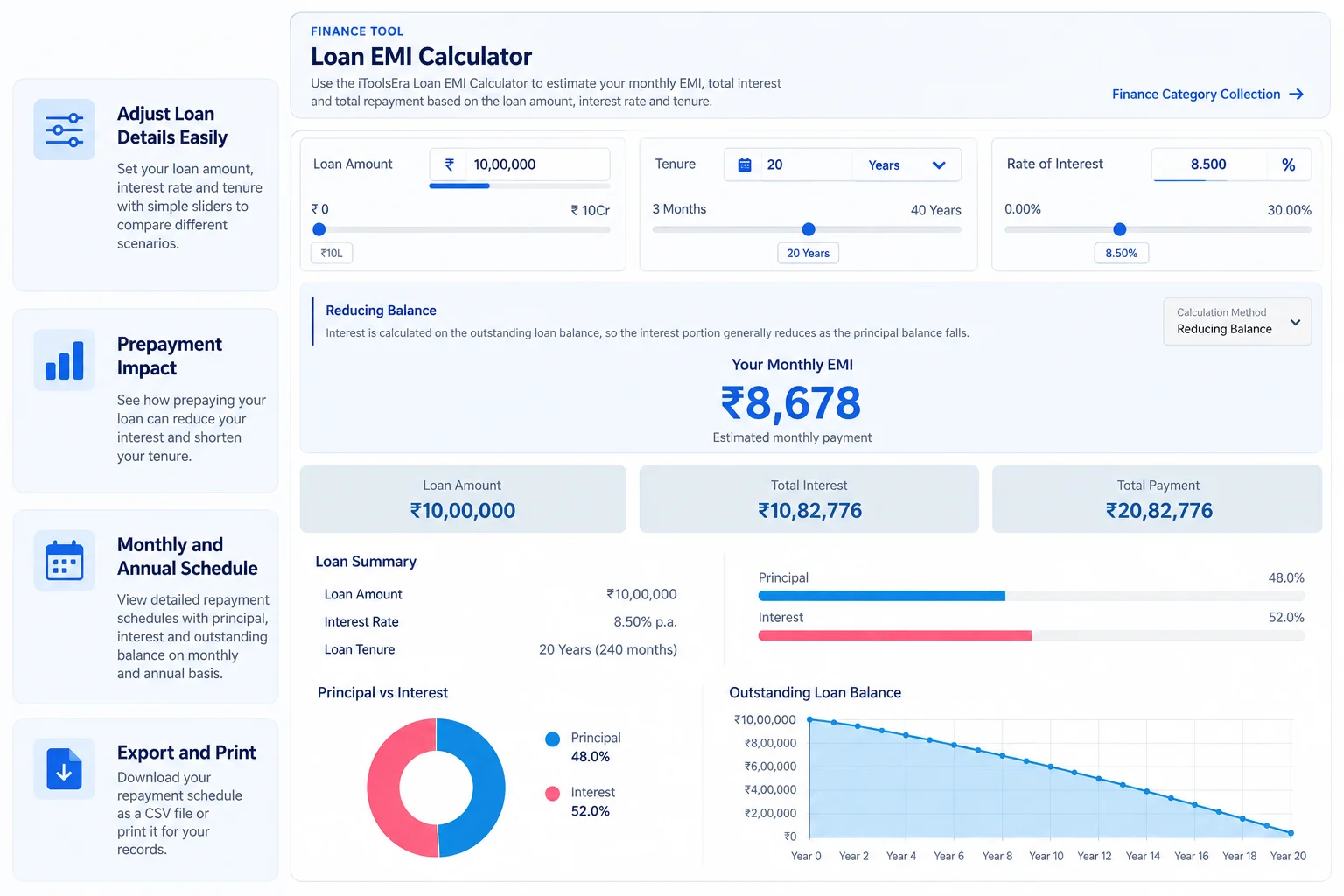
Loan EMI Calculator
Use the iToolsEra Loan EMI Calculator to estimate your monthly EMI, total interest and total repayment based on the loan amount, interest rate and tenure.
Loan Summary
| Loan Amount | ₹0 |
|---|---|
| Interest Rate | 0% |
| Loan Tenure | 0 Years |
Principal vs Interest
The chart shows how the total repayment is divided between principal and interest.
Outstanding Loan Balance
The chart shows the estimated outstanding loan balance over the repayment period.
Loan Prepayment Calculator
See how making an additional part-payment could reduce your EMI or shorten your remaining loan tenure.
Year-wise Repayment Summary
Annual breakdown of principal, interest and outstanding balance.
| Year | Total Payment | Principal Paid | Interest Paid | Closing Balance |
|---|
Monthly Amortization Schedule
Monthly principal, interest and outstanding balance.
| Month | EMI | Principal | Interest | Balance |
|---|
What Is a Loan EMI Calculator?
A Loan EMI Calculator helps you estimate the monthly Equated Monthly Instalment (EMI) for a loan using three main inputs: the loan amount, interest rate and repayment tenure.
Use the calculator to see the estimated monthly payment, total interest and total repayment. You can change the inputs to compare different borrowing and repayment scenarios before making a decision.
How Does a Loan EMI Calculator Work?
For a standard reducing-balance loan, the EMI is calculated from the principal amount, monthly interest rate and total number of monthly instalments.
P = principal, r = monthly interest rate, n = number of monthly instalments.
The calculator uses the selected calculation method configured for the product. Some products may use a different method, so the method shown above the result should always be checked before comparing two loans.
How to Use the Loan EMI Calculator
- Select the loan type you want to evaluate.
- Select a bank or lender when the calculator provides lender-specific options.
- Select the relevant loan product.
- Enter the loan amount, interest rate and repayment tenure, or adjust the sliders.
- Review the monthly EMI, total interest and total repayment shown in the results.
- Change one input at a time to compare different scenarios.
The values shown in the calculator are estimates. Always check the lender's current offer, fees and terms before applying.
Loan EMI Calculator for Different Types of Loans
Different loans can have very different rates, tenures, fees and eligibility requirements. The calculator can be used to estimate EMI across common loan categories, including:
- Home loans for residential property financing.
- Personal loans for general personal needs.
- Car loans for vehicle financing.
- Two-wheeler loans for motorcycles and scooters.
- Education loans for eligible education-related expenses.
- Business loans for business and working-capital needs where an EMI-based product applies.
- Gold loans with EMI-based repayment structures.
- Loan Against Property where repayment is structured through EMIs.
- Generic loans when you simply want to test an amount, rate and tenure.
Loan EMI Calculator for Different Banks and Lenders
The same EMI formula can be used with different lenders, but the actual terms offered by each lender can vary. Interest rate, processing charges, eligibility, tenure limits, repayment method and other conditions may depend on the product and borrower profile.
Use the lender and product selectors to start with the relevant configuration, then adjust the rate and other inputs when you have a specific offer to evaluate.
A Lower EMI Does Not Always Mean a Cheaper Loan
A lower monthly EMI can make a loan easier to manage, but it does not necessarily mean that you will pay less overall.
One common reason is a longer repayment tenure. Spreading the loan over more months can reduce the monthly payment while increasing the total interest paid over the life of the loan.
When comparing loans, look at both the monthly EMI and the total interest, not just the EMI.
How Does the Interest Rate Affect Your EMI?
When the loan amount and tenure stay the same, a higher interest rate generally increases the EMI and total interest payable.
Even a relatively small rate difference can matter over a long repayment period. Try changing only the interest rate in the calculator to see how the monthly payment and total repayment change.
How Do Loan Amount and Tenure Affect EMI?
- Higher loan amount: generally increases the EMI because you are borrowing more principal.
- Longer tenure: generally lowers the monthly EMI by spreading repayment over more months, but can increase total interest.
- Shorter tenure: generally increases the monthly EMI but can reduce the total interest when other inputs remain unchanged.
The best combination depends on what monthly payment you can comfortably manage and the overall cost you are willing to accept.
Loan EMI Example
Suppose you evaluate a loan of ₹10,00,000 at an annual interest rate of 8.5% for 20 years using the standard reducing-balance method.
The calculator can show the estimated monthly EMI along with total interest and total repayment. If you change the tenure to 10 years or change the rate, the result will change accordingly.
| Input | Example value |
|---|---|
| Loan amount | ₹10,00,000 |
| Interest rate | 8.5% p.a. |
| Tenure | 20 years |
| Calculation | Reducing balance |
The example is for illustration only. Your result depends on the values you enter.
Does Processing Fee Form Part of the EMI?
Usually, a processing fee is a separate charge and is not automatically part of the EMI calculation. The EMI calculator focuses on the loan principal, interest rate, tenure and the selected calculation method.
If a lender charges a processing fee, compare it separately with the EMI and total interest so that you have a better view of the overall borrowing cost.
What About Loan Prepayment?
Making a partial prepayment can reduce the outstanding principal and may reduce future interest, depending on the lender's rules and the option selected after prepayment.
Prepayment charges, minimum prepayment amounts and the choice between reducing EMI or reducing tenure can vary by lender and product. Check the applicable terms before making a prepayment decision.
Compare Different Loan Scenarios
One of the most useful ways to use an EMI calculator is to compare scenarios rather than calculating only once.
- Compare two different loan amounts.
- Compare a shorter and longer tenure.
- Test the effect of a higher or lower interest rate.
- Compare products or lenders using the same loan amount and tenure.
- Check the difference between monthly affordability and total borrowing cost.
Small changes can make a meaningful difference over a long repayment period, so keep a note of the scenarios that fit your budget.
Important Note About Calculator Results
This calculator is intended for estimation and comparison. It does not constitute a loan offer, approval or guarantee from any bank or financial institution.
Actual rates, fees, eligibility, repayment schedules and other terms can vary by lender, product, borrower profile, disbursement details and applicable policies. Where a lender-specific value has not been verified, the calculator may use an internal default to provide a starting point for estimation.
Always verify the current terms directly with the lender before applying or making a financial decision.
Helpful Guides
Useful guidance to help you understand EMI calculations, loan costs and repayment choices.
How Is EMI Calculated? Understanding Loan Amount, Interest Rate and Tenure
Learn how EMI is calculated using the formula, monthly interest rate and loan tenure. Follow a worked example and understand total repayment and interest.
Read Guide